AI coding tools let your team ship faster than ever. That is the pitch, and it is not wrong. But nobody talks about
what you are shipping. Right now, most teams use these tools to produce broken software at unprecedented speed.
Security holes, silent data corruption, exception handling that hides failures. None of this shows up in your sprint
velocity. It shows up when the product collapses under technical debt, or when a customer hits an unhandled edge case in
production. If your team uses AI coding tools without guardrails, you are not moving fast. You are accumulating
landmines.
AI doesn’t just write bad code
It makes bad code look convincing!
Silently swallowed exceptions. Missing null checks. Hallucinated API calls. Security holes that would fail any competent
review. But the variable names are reasonable, there are comments, the structure seems solid. So it passes the glance
test that most code review has become, and the bugs sail straight into production.
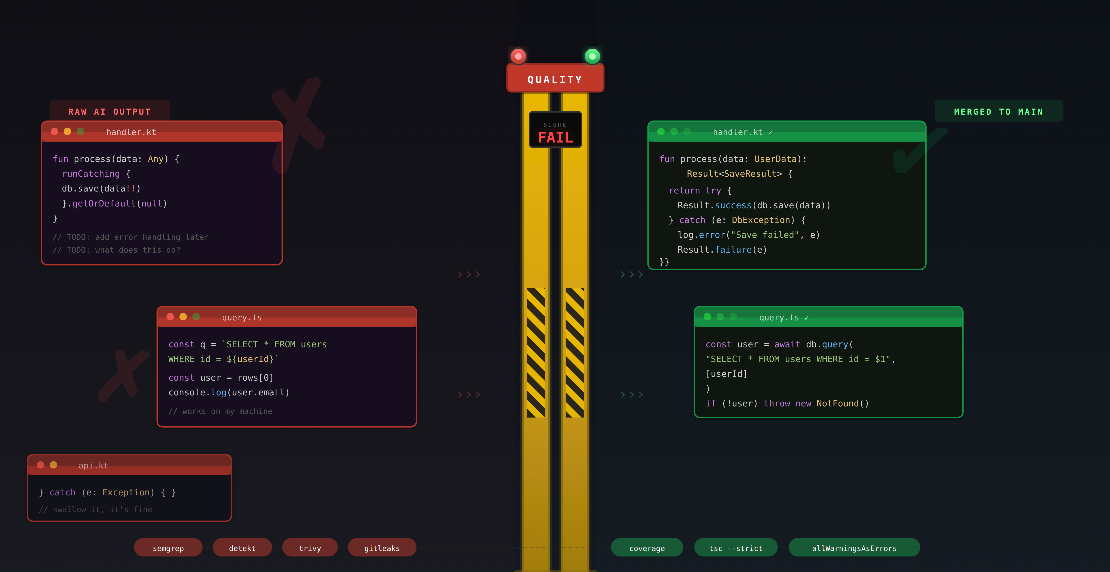
I have seen AI-generated Kotlin code that swallowed exceptions in a runCatching block, returned a default value, and
moved on. It compiled. The AI-generated tests only covered the happy path. The diff looked clean. It blew up three days
later.
You do not have to accept this. There are concrete, automatable measures that catch the worst offenders before they
reach your main branch.
Steer the Model Before It Writes
Two levers improve output before code ever hits a pipeline.
Human review is still the best gate we have. A senior engineer reading a diff catches intent mismatches,
architectural violations, and subtle bugs that no tool will find. But when every merge request is 80% AI-generated,
reviewers drown in volume and start rubber-stamping. If your team reviews AI code the same way it reviews human code, it
is not actually reviewing it.
Project-level instructions are your cheapest quality lever. Most teams have a CLAUDE.md or .cursorrules by now,
but most of them are shallow. “Use Kotlin.” “Follow our coding standards.” That is not useful. The model already tries
to do that.
Good project instructions are specific, negative, and grounded in your actual failure modes. They tell the model what
not to do, with enough context that it understands why. Here is what a useful CLAUDE.md covers:
## Error Handling

- Never use `runCatching` without explicit error handling. Always propagate
  exceptions with context.
- Never swallow exceptions. If you catch, log with full stack trace.

## Dependencies

- HTTP client: OkHttp only. No Apache HttpClient, no java.net.
- JSON: kotlinx.serialization. No Gson, no Jackson.

## Security

- Never concatenate strings into SQL. Parameterized queries only.
- Never log PII (email, name, IP, tokens).

## Patterns

- No `!!` non-null assertions. Use `requireNotNull()` with a message.
The key is to write rules that address things you have actually seen go wrong. Every time you catch AI-generated slop in
review, turn the feedback into a rule. The file becomes a living document of your team’s quality standards.
The Compiler as Your First Quality Gate
Before you reach for external tools, max out what the compiler already gives you. A strict compiler configuration
catches a surprising amount of AI slop for free.
Kotlin
Kotlin’s compiler has flags that most projects leave at their defaults. That is a mistake. Here is a low-tolerance
configuration for build.gradle.kts:
kotlin {
    compilerOptions {
        allWarningsAsErrors.set(true)
        freeCompilerArgs.addAll(
            "-Xjsr305=strict",           // Treat Java nullability annotations as strict
            "-Xemit-jvm-type-annotations", // Emit type-use annotations in bytecode
            "-Xjvm-default=all",          // Generate default methods in interfaces
            "-Xtype-enhancement-improvements-strict-mode",
            "-Xconsistent-data-class-copy-visibility",
        )
        extraWarnings.set(true)
    }
}
What this does:
allWarningsAsErrors is the big one. AI models generate code that compiles with warnings all the time. Unused
variables, unchecked casts, deprecated API calls. With this flag, every warning becomes a build failure. No
exceptions.-Xjsr305=strict makes Java nullability annotations (@Nullable, @NonNull from JSR-305 and JetBrains
annotations) into hard errors instead of mere hints. AI-generated code that calls Java libraries constantly gets
nullability wrong. This flag catches it at compile time.-Xtype-enhancement-improvements-strict-mode tightens type enhancement for Java interop even further. AI loves to
ignore platform types and treat everything as non-null. This makes the compiler complain.extraWarnings enables additional compiler diagnostics that are off by default.
The effect is immediate. A codebase that compiles cleanly under these settings has already passed a baseline that
rejects the most common AI mistakes: ignored nullability, unused code, deprecated APIs, and unchecked casts.
TypeScript
TypeScript has the same idea built into tsconfig.json. Here is a strict configuration:
{
  "compilerOptions": {
    "strict": true,
    "noUncheckedIndexedAccess": true,
    "noUnusedLocals": true,
    "noUnusedParameters": true,
    "noFallthroughCasesInSwitch": true,
    "forceConsistentCasingInFileNames": true,
    "exactOptionalPropertyTypes": true,
    "noPropertyAccessFromIndexSignature": true,
    "verbatimModuleSyntax": true
  }
}
The strict flag is a bundle that enables strictNullChecks, strictFunctionTypes, strictBindCallApply,
noImplicitAny, noImplicitThis, and more. But the flags that catch the most AI slop are the ones outside that bundle:
noUncheckedIndexedAccess adds undefined to any index access. AI-generated code constantly does
const item = arr[0] and uses item without checking if it exists. This flag forces the check.exactOptionalPropertyTypes distinguishes between “property is missing” and “property is undefined”. AI models
treat these as the same thing. They are not.noPropertyAccessFromIndexSignature forces bracket notation for index signature access, making dynamic property
access explicit. AI loves to dot-access everything.
Between Kotlin’s allWarningsAsErrors and TypeScript’s strict mode, you eliminate a large chunk of AI-generated bugs
before any external tooling even runs.
Quality Gates in CI
Everything below runs in GitLab CI. Every merge request. No exceptions. The pipeline fails, the merge is blocked.
Static Analysis
Semgrep lets you write custom rules for your project’s specific anti-patterns. AI loves
generating raw SQL string concatenation, eval(), !! non-null assertions in Kotlin, and any casts in TypeScript. A
custom Semgrep rule turns that from “hope the reviewer catches it” into “the pipeline rejects it.”
semgrep:
  stage: test
  image: semgrep/semgrep:latest
  script:
    - semgrep scan --config p/default --config .semgrep/ --error
  rules:
    - if: $CI_PIPELINE_SOURCE == "merge_request_event"
The --config .semgrep/ flag points to a directory of project-specific rules. That is where you encode institutional
knowledge that AI models have no way of knowing. “We never use this ORM pattern because it causes N+1 queries in our
schema.” “We do not log user emails because GDPR.” These rules accumulate over time and they are worth their weight in
gold.
On top of Semgrep, run detekt for Kotlin or ESLint for TypeScript. Semgrep
is great at pattern matching. Detekt and ESLint are better at language-specific code smells and complexity analysis.
Complexity Limits
Code complexity metrics measure how many independent paths exist through a function. The most common one is cyclomatic
complexity: every if, when branch, for loop, catch block, and logical operator (&&, ||) adds a path. A
function with a complexity of 20 has 20 distinct execution paths. That means 20 paths to test, 20 paths to reason about
during review, and 20 places where a bug can hide.
Why does this matter for AI-generated code? Because models optimize for “it works,” not for “a human can maintain this.”
They produce long functions with deeply nested conditionals that technically compile but are impossible to review with
confidence. If you cannot reason about a function, you cannot review it. If you cannot review it, you cannot trust it.
Detekt enforces complexity limits for Kotlin. Run it in CI:
detekt:
  stage: test
  image: gradle:jdk21
  script:
    - gradle detekt
  rules:
    - if: $CI_PIPELINE_SOURCE == "merge_request_event"
The defaults are lenient. Override them in detekt.yml:
complexity:
  CyclomaticComplexMethod:
    active: true
    threshold: 10
  LongMethod:
    active: true
    threshold: 30
  LongParameterList:
    active: true
    threshold: 5
  NestedBlockDepth:
    active: true
    threshold: 3
A cyclomatic complexity threshold of 10 is strict but realistic. LongMethod at 30 lines forces the AI (and the
developer) to break things apart. NestedBlockDepth at 3 rejects the deeply nested if-in-when-in-forEach
constructs that AI loves to produce. LongParameterList at 5 catches functions that try to do too many things at once.
When the AI generates a function too complex to pass, the developer has to refactor it. That is the gate working as
intended.
Dependency and Container Scanning
AI models happily pull in outdated or compromised packages. They were trained on code from two years ago and suggest
those versions without hesitation.
Trivy scans both your dependency tree and your container images:
trivy_scan:
  stage: test
  image: aquasec/trivy:latest
  script:
    - trivy fs --exit-code 1 --severity HIGH,CRITICAL --ignorefile .trivyignore .
    - trivy image --exit-code 1 --severity HIGH,CRITICAL $CI_REGISTRY_IMAGE:$CI_COMMIT_SHA
  allow_failure: false
The --exit-code 1 is the important part. Without it, Trivy reports findings but the pipeline keeps going. That is
worse than not scanning at all because it creates the illusion of security. The .trivyignore file is your escape hatch
for known false positives, but every entry should require a comment explaining why.
Secret Detection
Models trained on public repositories sometimes reproduce API keys and secrets from their training data. I have seen it
happen. Gitleaks catches this:
gitleaks:
  stage: test
  image: zricethezav/gitleaks:latest
  script:
    - gitleaks detect --source . --verbose --redact --log-opts "$CI_MERGE_REQUEST_DIFF_BASE_SHA..$CI_COMMIT_SHA"
  rules:
    - if: $CI_PIPELINE_SOURCE == "merge_request_event"
The --log-opts range scans only the commits in the merge request, not the entire repository history. This keeps the
scan fast and the output focused.
Test Coverage as a Gate
Not as a vanity metric. Not a badge in your README. As a hard gate on critical paths.
Pair your test runner with a coverage threshold in your GitLab merge request settings. The point is not to chase 100%.
It is to catch the pattern where AI generates a new module with zero tests, or modifies existing code and deletes the
tests that covered it. I have seen both.
Test coverage as a quality metric is generally debatable and highly depends on the team and the product. I personally do
not give a lot about coverage numbers. But in the context of AI-generated code, a coverage gate is less about measuring
quality and more about catching the case where the AI simply skipped writing tests altogether.
Shift Left: Run the Gates Locally
Most of these tools do not need a CI pipeline to run. Detekt, Semgrep, Gitleaks, your compiler with strict flags - they
all work locally. That means you can catch problems before a merge request even exists.
More importantly, you can make the AI catch its own problems. Tools like Claude Code execute commands as part of their
workflow. If your CLAUDE.md includes instructions like this:
## Before Submitting Code

- Run `gradle detekt` and fix all findings before proposing changes.
- Run `semgrep scan --config .semgrep/ --error` and resolve violations.
- Run `npx tsc --noEmit` to verify the TypeScript code compiles cleanly.
The AI will run these checks, read the output, and fix its own code before a human ever sees it. The feedback loop that
normally happens across multiple review rounds collapses into a single iteration. The developer who picks up the merge
request gets code that already passes the baseline, not code that fails on the first pipeline run.
This is the practical advantage of automatable quality gates. They are not just for CI. They are instructions that both
humans and AI assistants can follow.
The Floor, Not the Ceiling
These gates will not catch flawed business logic or a bad architecture. They raise the floor, not the ceiling. But they
reject the worst slop automatically and hold every line of code to the same standard, regardless of who or what wrote
it.
The goal is not to ban AI tools. They can be useful and that ship has sailed anyways. The goal is to keep the bar high
for code entering your repository.
No gate replaces accountability, though. Ownership of code is a human concept. The AI did not sign up for on-call. It
will not debug the production incident at 2 AM or explain to a customer why their data was corrupted.
Every individual contributor is responsible for committing stable, maintainable, tested, and well-documented code. That
responsibility does not change because an AI wrote the first draft. The tools you use in the process are your choice.
The quality of the result is your responsibility.

 Frank Neff